Lipi · Slides
Beamer, with the slides in view
Open a Beamer deck and Lipi grows a Slides menu: new slides from layouts, a sorter of the built slides to rearrange by dragging, slides hidden without being deleted, and presenting full screen.

Hidden, not deleted
Hide a slide, in the sorter or from Slides → This Slide, and it is left out of the PDF but kept in the source. It stays in the sorter, dimmed and marked, fades in the editor, and is greyed in the outline with a crossed-out eye.
In the file, a hidden slide is wrapped in \iffalse … \fi lines
marked “hidden by Lipi”, so any other editor and any build sees exactly the same deck.
- The outline is editable too, if you turn it on: right-click a section or a slide to hide, show, move or delete it, or drag it onto another.
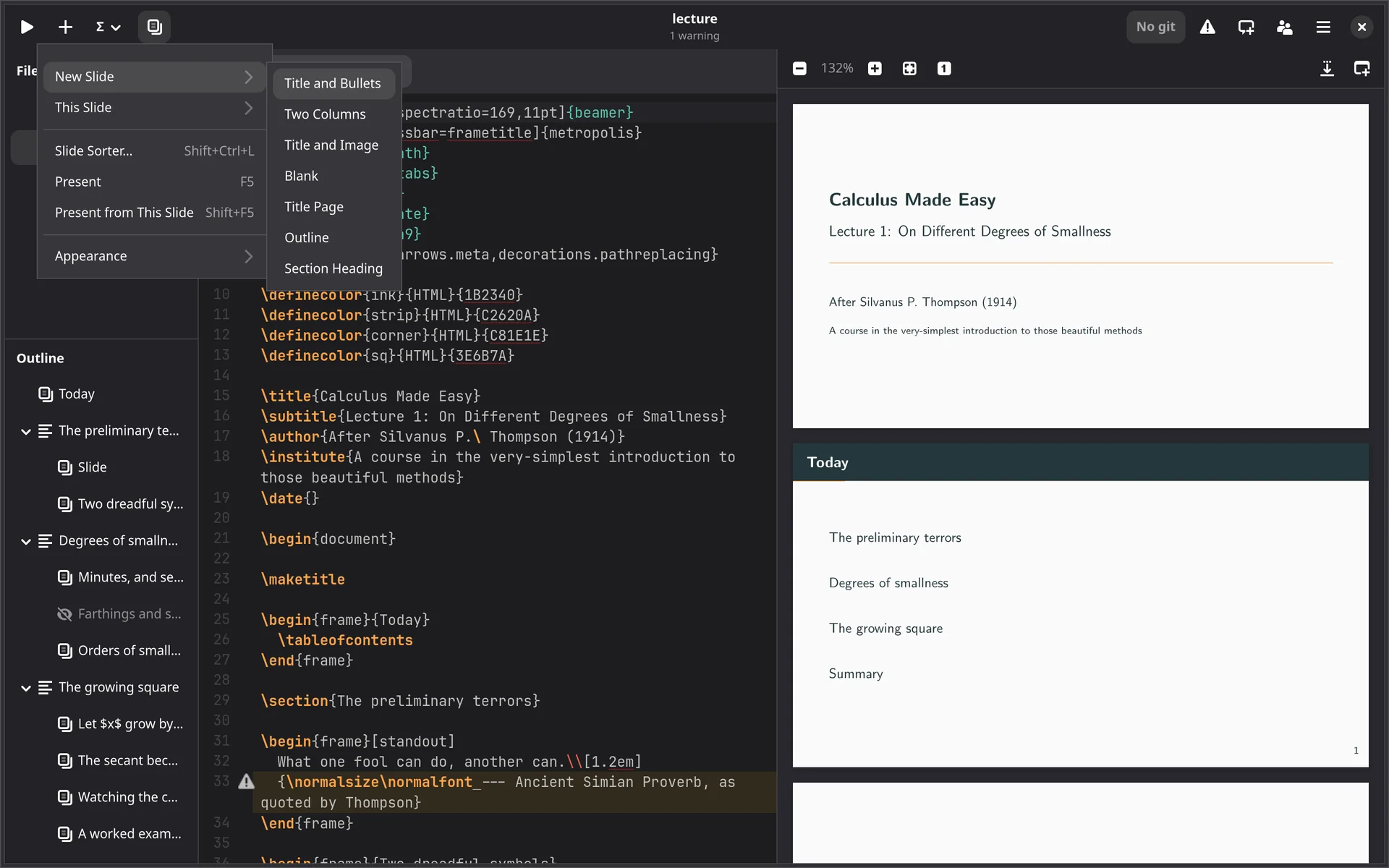
The whole deck from one menu
New slides from layouts
Title and bullets, two columns, title and image, title page, outline, section heading.
This slide
Duplicate, delete, move or hide the slide the cursor is in.
Appearance
The theme (Argüelles, metropolis and moloch first), colours, the slide shape (4:3, 16:9 and others), and hiding the navigation symbols.
Presenting
F5 full screen, Shift+F5 from the slide you are in; arrows, Space or Page Up and Down to move, Esc to stop.
In the outline
Slides appear in the outline under their sections, so a long deck is a click from any slide.
Animations and video
Play in the preview as you write, as they will in the room.
For the lecture itself, open the deck in Sulekha: a presenter view with your notes, ink over the slides, and a recording you can publish. Presenting in Sulekha →
The slide sorter, presenting, outline editing and page sync come with a licence.